Technology plays an important role in almost every small business, from processing customer payments to managing employee accounts, storing documents, and communicating with clients. But keeping computers, networks, software, and security systems working properly can become difficult without dedicated technical support. A slow computer, network outage, failed backup, or security incident can interrupt daily operations and affect customer service. Hiring a full-time IT department is not always practical for a company with a limited budget.
This is where managed IT services for small businesses can help. By working with an external IT provider, businesses can access ongoing technical support, cybersecurity, network management, and other technology services without building an entire IT department internally.
Understanding the available options, pricing models, and service agreements can help you decide whether outsourcing IT management is the right choice for your business.
What Are Managed IT Services for Small Businesses?
Managed IT services are ongoing technology management and support provided by an external company known as a Managed Service Provider (MSP).
Instead of contacting a technician only when something breaks, a business works with an IT provider that monitors, maintains, and supports its technology environment under an ongoing service agreement. Depending on the agreement, an MSP may manage computers, servers, networks, cloud platforms, cybersecurity tools, software updates, and employee support requests.
For example, a small accounting firm might use managed IT services to maintain employee computers, protect financial records, manage Microsoft 365 accounts, monitor its network, and maintain data backups.
The provider handles the agreed technical responsibilities while the business concentrates on serving clients and managing daily operations. Not every MSP offers the same services. Some provide complete IT management, while others specialize in cybersecurity, cloud infrastructure, networking, or specific technology platforms.
What Do Managed IT Support Services Include?
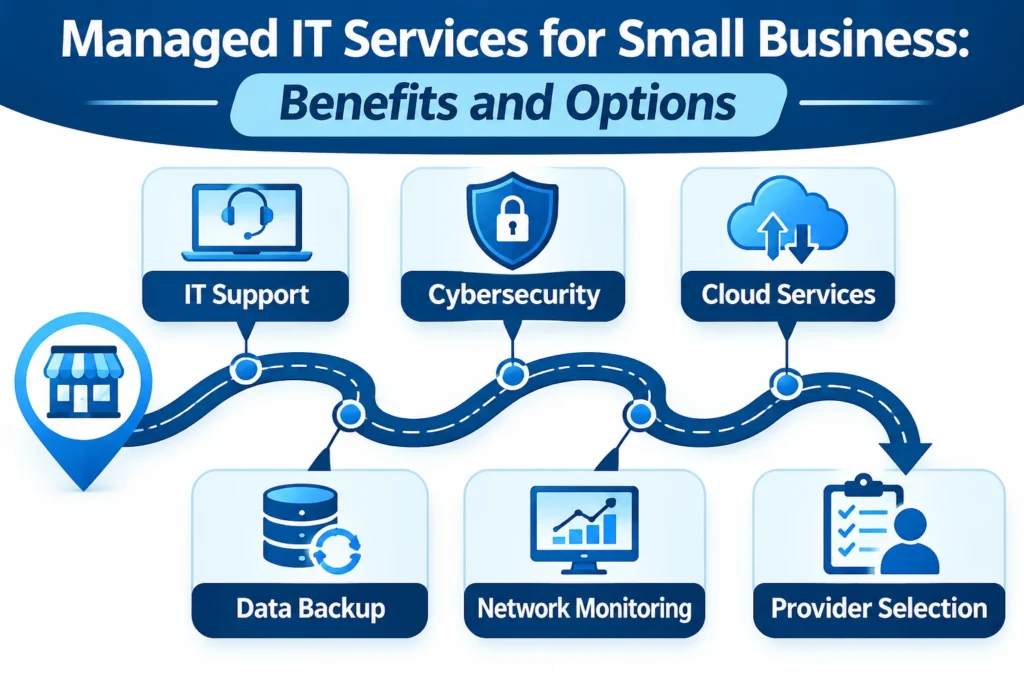
Managed IT support services can cover several areas of a business’s technology environment. The exact combination depends on company size, industry requirements, existing infrastructure, and the service agreement.
Here are some common services small businesses may receive.
1. Help Desk and Technical Support
Employees sometimes experience problems with computers, printers, email accounts, software applications, or network connections. A managed IT provider gives employees a designated support channel for reporting these issues. Depending on the agreement, assistance may include remote troubleshooting, software configuration, account access problems, device setup, and on-site technical visits.
Before choosing a provider, check its support hours, available contact methods, and guaranteed response times.
2. Network Monitoring and Management
A business network connects computers, printers, servers, wireless devices, and other equipment. If network performance becomes unreliable, employees may experience slow connections, interrupted applications, and difficulty accessing important files. Network management involves monitoring network devices, maintaining configurations, identifying performance problems, and addressing potential failures.
Some providers also manage routers, switches, firewalls, wireless access points, and connections between multiple business locations.
3. Cybersecurity Management
Small businesses handle information that may include customer details, employee records, payment information, and confidential business documents. Managed cybersecurity services help protect these resources through multiple security measures.
Common offerings include:
- Endpoint protection for computers and laptops
- Firewall configuration and monitoring
- Email security and phishing protection
- Multi-factor authentication management
- Security patching and vulnerability monitoring
- Employee security awareness training
- Threat detection and incident response support
However, businesses should not assume that a standard managed IT package includes comprehensive cybersecurity. Ask which protections are actually included and which require a separate agreement.
4. Data Backup and Disaster Recovery
Accidental deletion, hardware failure, ransomware, and other incidents can make important business information unavailable. Backup services create copies of essential data so it can be recovered when necessary. Disaster recovery goes further by establishing procedures for restoring systems, applications, and business operations after a serious disruption.
When evaluating this service, ask:
- How frequently are backups performed?
- Where are backup copies stored?
- Are backups protected from ransomware?
- How long does recovery usually take?
- Are restoration tests performed?
- Who is responsible for verifying successful recovery?
A backup that has never been tested should not automatically be considered a reliable recovery solution.
5. Cloud Services and Management
Many small businesses depend on cloud platforms for email, file storage, collaboration, accounting, and business applications. An MSP may help configure and manage services such as Microsoft 365, cloud storage, virtual servers, and cloud-based business systems. Typical responsibilities include account management, access permissions, security settings, service configuration, and troubleshooting.
Cloud services can make it easier for employees to work from different locations, but they still require proper security and ongoing administration.
6. Device and Endpoint Management
Every connected computer, laptop, and supported mobile device can introduce security and maintenance challenges. Endpoint management helps businesses maintain these devices through centralized administration.
Services may include:
- Operating system updates
- Security patch management
- Antivirus and endpoint protection
- Device performance monitoring
- Software installation and configuration
- Employee onboarding and offboarding
- Remote device management
A consistent device-management process helps reduce the number of unmanaged computers operating within a business environment.
7. Email and Microsoft 365 Management
Business email is essential for communication, customer relationships, and daily operations. Managed email services may include account creation, mailbox configuration, spam filtering, access controls, security settings, and troubleshooting. An IT provider may also help manage Microsoft Teams, SharePoint, OneDrive, and other collaboration tools.
The goal is to keep communication systems properly configured, accessible, and protected.
8. IT Consulting and Strategic Planning
Technology decisions can have long-term financial and operational consequences.
An MSP may provide IT consulting to help businesses plan equipment upgrades, software migrations, cloud adoption, network improvements, and technology budgets. Some providers offer virtual Chief Information Officer (vCIO) services, which provide strategic technology guidance without requiring a full-time executive hire. This can be useful when a business is growing and needs more structured IT planning.
Benefits of Managed IT Services for Small Businesses
Outsourcing IT management can offer several advantages, particularly for companies that lack dedicated technical staff.
Predictable IT Expenses
Hiring internal IT employees involves salaries, benefits, training, recruitment, and additional operating costs. Managed IT services typically use recurring service agreements, allowing businesses to plan for ongoing technology support. A fixed monthly fee can make budgeting easier, although additional charges may apply for projects, hardware, licenses, or services outside the agreement.
Access to a Wider Range of Expertise
One internal IT employee may not have experience with every area of networking, cybersecurity, cloud infrastructure, and data recovery. A managed IT provider may offer access to technicians and specialists with different technical backgrounds. This allows small businesses to obtain broader expertise without employing a separate specialist for every technology requirement.
Reduced Downtime
Technical problems can interrupt employee productivity and delay customer services. Proactive monitoring and scheduled maintenance can help identify certain problems before they become major disruptions. For example, monitoring may identify a failing storage device or an overloaded network before it causes a complete service interruption. No provider can eliminate all downtime, but proper maintenance and recovery planning can improve operational resilience.
Improved Cybersecurity Management
Security requires ongoing attention rather than a one-time software installation. An MSP can help maintain security tools, apply patches, monitor systems, manage access permissions, and respond to suspicious activity. The effectiveness of these services depends on the provider’s capabilities and the security measures included in the contract.
Support That Can Scale With Business Growth
A business with five employees may have different technology requirements from one with fifty employees and multiple locations. Managed IT arrangements can often expand as new employees, devices, applications, and locations are added. This makes it easier to adjust support requirements without immediately building a larger internal IT department.
More Time for Core Business Activities
Business owners and employees should not have to spend their working hours repeatedly troubleshooting technical problems. Having a dedicated support arrangement can reduce the time spent handling routine IT issues. Employees can focus more on customer service, sales, operations, and other responsibilities that contribute directly to business goals.
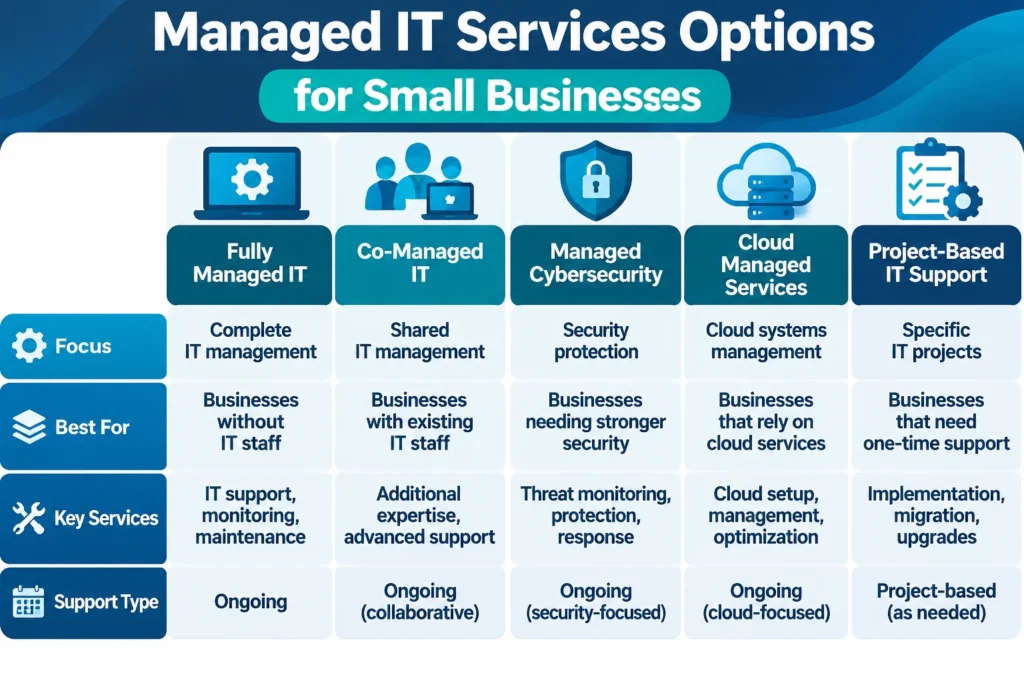
Different Managed IT Service Options for Small Businesses
Not every small business needs the same level of outsourced support. Understanding the available arrangements can help you select an option that matches your internal capabilities.
Fully Managed IT Services
With fully managed IT services, an external provider takes responsibility for the agreed technology management activities. This may include help desk support, network monitoring, cybersecurity administration, backups, device management, and ongoing maintenance.
This arrangement is suitable for businesses without an internal IT department or those that prefer to outsource most routine technology operations. However, the business should still maintain oversight of its systems, data, budgets, and security responsibilities.
Co-Managed IT Services
Co-managed IT services involve cooperation between an external provider and an existing internal IT employee or team. For example, a small company might have one internal IT administrator who handles daily employee requests while an MSP manages advanced cybersecurity, network monitoring, or backup infrastructure.
This arrangement provides additional technical resources without replacing the existing IT staff. It can be particularly useful for growing businesses that need specialist support but still want internal control over everyday technology decisions.
Managed Cybersecurity Services
Some businesses already have basic IT support but need stronger protection against security threats. Managed cybersecurity providers focus on services such as threat monitoring, endpoint detection, firewall management, vulnerability assessments, security awareness training, and incident response. These services may be delivered separately or alongside general managed IT support.
Businesses handling sensitive customer information should evaluate cybersecurity requirements carefully before choosing a provider.
Cloud Managed Services
Cloud managed services focus on the administration, maintenance, and security of cloud-based systems. A provider may help manage cloud infrastructure, user permissions, storage, backups, application availability, and migration projects.
This option can be useful for companies that rely heavily on cloud applications but lack the technical resources to manage them independently.
Project-Based IT Support
Some companies do not need a full managed IT agreement but occasionally require professional technical assistance.
Project-based support can cover activities such as:
- Moving business data to cloud storage
- Installing a new office network
- Upgrading computers and servers
- Migrating email systems
- Setting up business applications
- Improving wireless connectivity
This option works well for businesses with relatively stable IT environments that need help with specific projects.
Managed IT Services vs. Break-Fix IT Support
Managed IT services and break-fix support are two different approaches to handling business technology. With break-fix support, a business contacts a technician when something goes wrong and typically pays for the work performed. Managed IT services involve an ongoing agreement under which the provider handles designated maintenance, monitoring, and support responsibilities.
| Comparison | Managed IT Services | Break-Fix Support |
|---|---|---|
| Support approach | Ongoing management | Reactive assistance |
| Monitoring | Included when contracted | Usually limited |
| Maintenance | Scheduled and proactive | Often performed after problems occur |
| Billing | Recurring or agreed service fees | Per incident or service call |
| Cybersecurity | May be included | Often separately arranged |
| Planning | Can include long-term IT planning | Usually focused on immediate repairs |
| Cost planning | Generally more predictable | Can fluctuate significantly |
Neither arrangement is automatically right for every business.
A company with complex systems, multiple employees, and sensitive information may benefit from ongoing management. A very small business with limited technology needs might prefer occasional support.
The important consideration is whether the selected arrangement provides adequate protection, reliability, and support for the business.
How Much Do Managed IT Services Cost?
The cost of managed IT services for small businesses depends on the size of the technology environment and the level of support required.
There is no single price that applies to every company. A business with ten employees and a simple cloud-based setup will have different requirements from a company with multiple offices, servers, and specialized applications.
Common pricing models include:
Per-User Pricing
The provider charges a recurring fee for each supported employee. This approach can make budgeting straightforward when most employees use similar technology and require comparable support.
Per-Device Pricing
The monthly charge is based on the number of managed devices, such as computers, servers, and network equipment. This model may be suitable for businesses with different device requirements or shared workstations.
Flat Monthly Pricing
Some providers offer a fixed monthly fee for an agreed collection of services. This can make expenses easier to forecast, but businesses should confirm whether the agreement includes unlimited support, onsite visits, after-hours assistance, and additional projects.
Tiered Service Packages
Some managed IT services companies offer multiple packages with different levels of support.
A basic package might cover monitoring and routine maintenance, while higher-level packages may include advanced cybersecurity, disaster recovery, and strategic IT planning.
What Factors Affect the Price?
Several factors can influence the final quote:
- Number of employees and supported devices
- Number of business locations
- Network and server complexity
- Cybersecurity requirements
- Backup storage and recovery needs
- Cloud applications and software licenses
- Support availability and response commitments
- Onsite service requirements
- Initial setup and migration work
When comparing quotations, examine the complete service scope rather than selecting the lowest monthly price. A less expensive package may exclude important security services or charge separately for support that another provider includes.
How to Choose an IT Managed Services Provider
Selecting an IT managed services provider is an important business decision because the provider may receive access to company systems,